CMS Versioning Capabilities and Comparison
| About this Article | Published December 29 2025 By Malcolm Teasdale Tags: git-like versioning, cms versioning, release management |
Versioning is a foundational capability of modern Content Management Systems (CMS). It enables teams to track changes, collaborate safely, recover from errors, and manage complex publishing workflows. This article compares how leading CMS platforms implement versioning, introduces a concise versioning maturity model, and visually positions each CMS within that model.
How Versioning Is Achieved in Leading CMS Platforms
Concrete CMS
Concrete CMS automatically creates a new version of a page each time it is edited and saved. Editors can view a full version history, compare versions side by side, and revert to earlier states. Versioning is page-centric and tightly integrated into the editorial UI, making it accessible to non-technical users.
Drupal
Drupal uses entity-based revisions, most commonly for content nodes. Each save can create a new revision with metadata identifying the editor and timestamp. Editors can revert to previous revisions, and contributed modules extend versioning with moderation workflows, enhanced comparison tools, and staged publishing.
Contentstack
Contentstack provides versioning for both content entries and content schemas. Editors can compare historical versions to see exactly what changed and revert entries when needed. Versioning is integrated into editorial workflows and supports enterprise headless use cases, though it does not provide full branching across environments.
Contentful
Contentful implements snapshot-based versioning. Each publish or republish action creates a snapshot of an entry, which can be retrieved via API or restored through the UI. Versioning is primarily entry-level, with environments sometimes used to emulate branching, though this is more limited than true Git-style workflows.
Enterprise WordPress
WordPress core includes a Revisions system that automatically stores prior versions of posts and pages. Editors can compare revisions and restore earlier versions. In enterprise deployments, content revisions are often combined with external Git-based workflows for code, themes, and configuration, as WordPress does not natively support branching for content.
CrafterCMS
CrafterCMS uses a Git-backed content repository. Every content change is stored as a Git commit, enabling full version history, diffs, rollbacks, and branching. This approach aligns content operations with DevOps practices and supports advanced workflows such as parallel development and release-based publishing.
A Git-based CMS stores content directly in a Git repository. Content changes are committed as Git commits, and the CMS relies on native Git concepts such as branches, merges, commits, and diffs. A Git-based CMS is most appropriate when content is tightly coupled with code, teams are developer-heavy, and deployment is fully automated.
Cloud CMS (Gitana)
Cloud CMS (Gitana) employs a Git-like changeset versioning model. Every create, update, or delete operation is captured as a transactional changeset. The platform supports workspaces, branching, visual diffs, and rollback at the content, workspace, or repository level, making it well suited for complex enterprise content operations.
A Git-like CMS implements its own internal versioning system inspired by Git concepts but does not store content in an actual Git repository. Instead, it uses a database-driven changeset or snapshot model that behaves similarly to Git while abstracting away Git itself. A Git-like CMS is better suited when content is a shared enterprise asset, editorial governance matters, and non-technical users must collaborate safely at scale.
CMS Versioning Feature Comparison
| CMS Platform | Revision History | Compare / Diff | Rollback Scope | Branching | Workflow Integration | API Access |
|---|---|---|---|---|---|---|
| Enterprise WordPress | Yes (posts/pages) | Basic | Item-level | No | Plugin-based | Limited |
| Concrete CMS | Yes (pages) | Built-in UI | Page-level | No | Basic | Limited |
| Drupal | Yes (entities) | Core + modules | Item-level | No (native) | Strong (modules) | Yes |
| Contentful | Yes (snapshots) | Basic UI / API | Entry-level | Limited (environments) | Via extensions | Yes |
| Contentstack | Yes (entries & schemas) | Built-in UI | Entry-level | No | Yes | Yes |
| CrafterCMS | Yes (Git-based) | Git diff | Repository / commit | Yes | Strong | Yes |
| Cloud CMS (Gitana) | Yes (changesets) | Visual diff | Workspace / release | Yes | Strong | Yes |
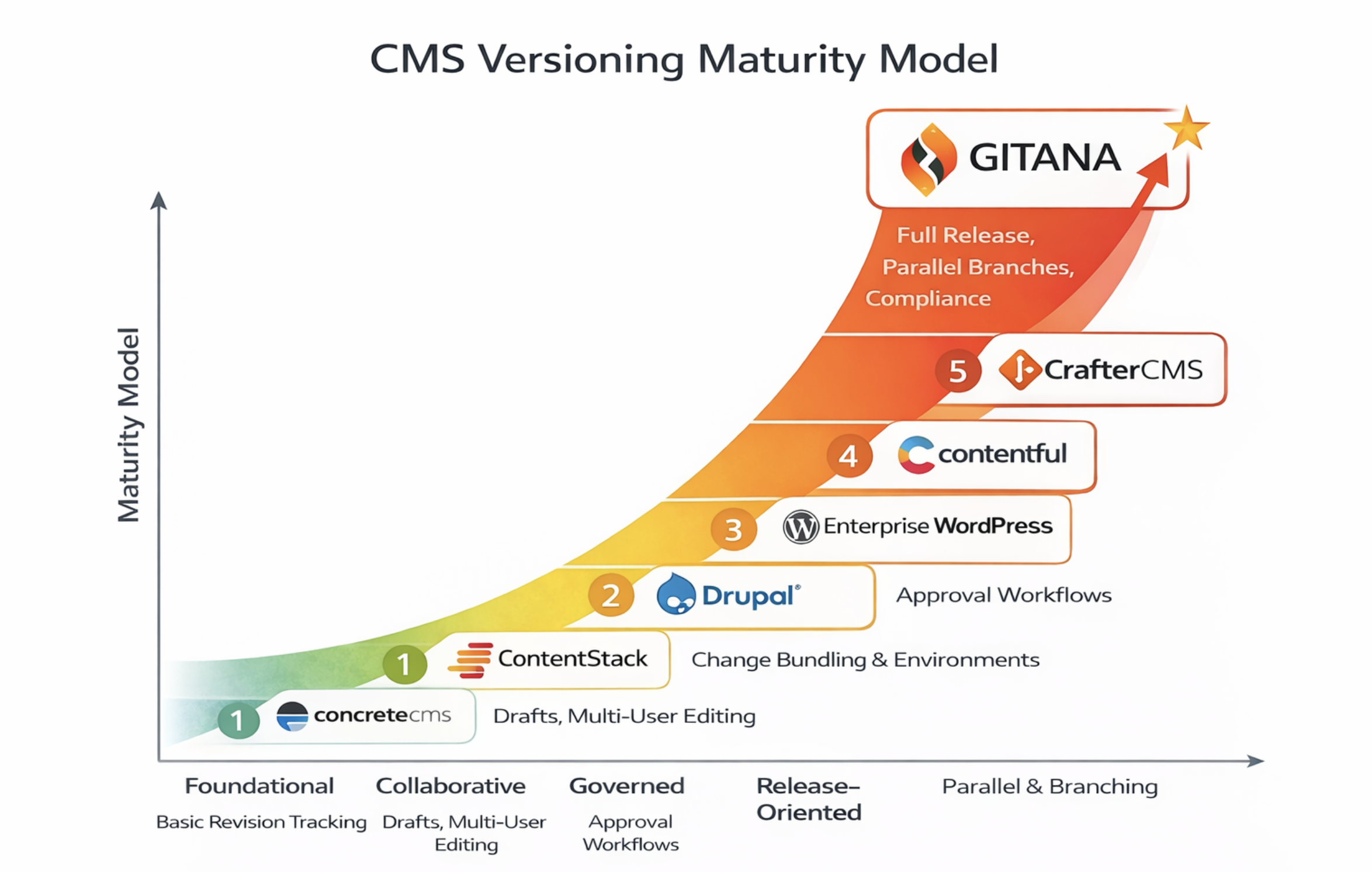
CMS Versioning Maturity Model
A CMS versioning maturity model describes how platforms evolve from basic revision tracking to enterprise-grade change management.
At lower maturity levels, versioning exists primarily as a safety mechanism, allowing editors to undo mistakes on individual content items. As maturity increases, platforms introduce comparison tools, workflow integration, and better auditability. At the highest levels, versioning mirrors software development practices, supporting branching, merging, release snapshots, and coordinated rollbacks across environments.
CMS Versioning Maturity Across CMS Platforms
Key Takeaways
Versioning maturity varies significantly across CMS platforms.
- Platforms like WordPress and Contentful provide foundational revision safety.
- Concrete CMS, Drupal, and Contentstack support richer editorial comparison and rollback.
- CrafterCMS and Cloud CMS (Gitana) represent the highest maturity, provides full change history, safe rollback, and support for parallel work through branching and merging, significantly reducing risk as content scales across teams and channels. It applies proven software versioning principles to content, enabling controlled releases, stronger governance, and alignment with modern DevOps practices.
- Cloud CMS (Gitana) applies Git principles natively to structured content, enabling branching, merging, and release management without requiring authors to interact with files, repositories, or developer tooling. This provides the same rigor and auditability as Git-based systems while remaining purpose-built for content governance, compliance, and large-scale editorial operations.
When evaluating a CMS, organizations should align their versioning needs with collaboration complexity, governance requirements, and long-term digital delivery strategy.